Controller
Your Arctic Heat Pump controller is a very important piece of equipment, even if you are controlling the system with a 3rd party controller.
The heat pump controller must be connected and should be installed in the mechanical room.
Touch Screen Controllers (R32)
The primary controllers as of 2025 are the touch screen models that ship with the R32 series heat pumps.
Adjusting the Temperature
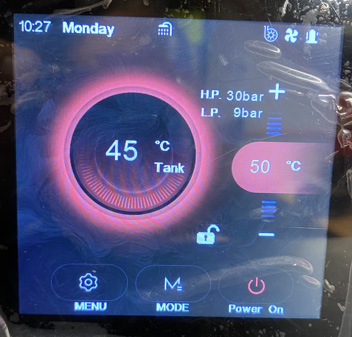
When viewing the controller, the temperature in the circle is the current water temp, the temperature on the right side is the SET point. Press the + or – buttons to adjust the temperature.
Celsius to Fahrenheit
- Press “Menu > Program > User Settings”
- Page down to the last item on the last page. (59 TEMP)
- 0 = Celsius
1 = Fahrenheit
Heating / Cooling
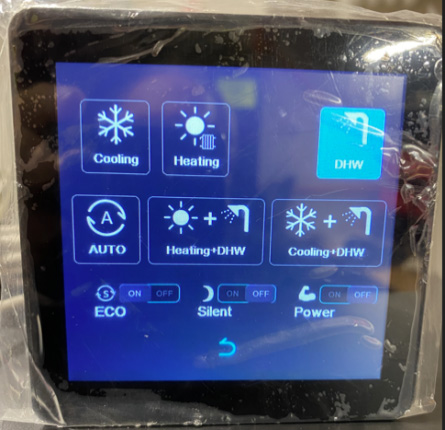
- Press “Mode” on the home screen
- Your options will appear on the screen that appears… (your options may differ from this image)
- Simply choose the heating/cooling mode you would like.
NOTE: In an EVI system, DHW = Heating Mode
Checking your DELTA T Across the Inlet and Outlet
- Press “Menu > Program > State”
- Page down to find both the “Inlet water temp”
and the “outlet water temp”.
- The difference between those temperatures is the current Delta T
Check for Recorded Error Codes
If the system has encountered any errors, they will appear in this list.


